
Call Center CRM Software
Best Call Center CRM Software: Automate Incoming Calls with SIP Integration, Record Calls & Streamline Customer Relationships
Included Asterisk integration; you can easily access call records, detailed call reports, and agent performance reports — all from a single unified system.
Features
Core features that make it one of the best choices for modern call centers
Advanced PBX integration, your Asterisk call center server works seamlessly with the CRM. Automatic call matching, real-time screen pops, click-to-call functionality, and full synchronization between your telephony system and customer data.
Analyze customer interaction reports, agent performance metrics, call statistics, and team productivity — all in one dashboard. Make data-driven decisions to strengthen customer relationships and optimize your call center operations.
Easily import your entire customer database using Excel files. During the import process, you can assign multiple agents to customers, set priorities, customer status, customer group and organize data quickly — saving hours of manual work. Import your customers easily.
Track your sales pipeline effectively with the customer status screen. Create color-coded customer statuses that your agents can update in real-time. Monitor deal progress, follow-ups, and closing rates to boost your sales performance.
The system includes three main user role groups: Admin, Team Manager, and Agent. You can create custom user groups and assign specific permissions to managers, ensuring secure and organized access control across your call center.
Easily create and manage agent groups from the user groups screen. Assign agents to different teams and give Managers authority based on these groups. This feature helps you organize your workforce efficiently and improves team supervision.
Detailed Features of Call Center CRM Software
Customer List & Excel Customer Import
Easily import your customer database using Excel files. You can download a ready-made template from the “Import from Excel” page to ensure perfect compatibility. Format your Excel files according to the template and upload them quickly — supporting bulk assignments to multiple agents during import.
Full Asterisk PBX Integration – Browser-Based & Mobile Friendly
Our call center CRM works seamlessly with your Asterisk virtual PBX. Agents, team managers, and admins can access the system from any location via a web browser. The platform is fully responsive and compatible with mobile phones and tablets, enabling your team to work flexibly from anywhere.
Team & Group Management
Create custom teams and agent groups easily from the user groups screen. Assign agents to specific teams and give team managers authority over multiple groups. This flexible structure helps you organize your workforce efficiently and improves supervision.
Click-to-Call
Agents can dial any customer directly from their profile with a single click. The dialed number can be hidden from the agent for added security and compliance.
Customer Number Privacy
Only users with Admin or Moderator privileges can view customer phone numbers in the management panel. Agents can make calls without seeing the actual numbers, ensuring data security and privacy.
Customer Notes Management
Agents can add private notes to each customer’s profile. The most recent note appears directly in the customer list for quick reference. Moderators and admins can delete notes when reassigning customers.
Customer Status Management
After each call, agents can update the customer’s status. Admins can create and edit color-coded statuses for better visual tracking. Team managers and admins can view daily summary statistics of all customer statuses on their dashboard homepage.
Live Call Center Widget
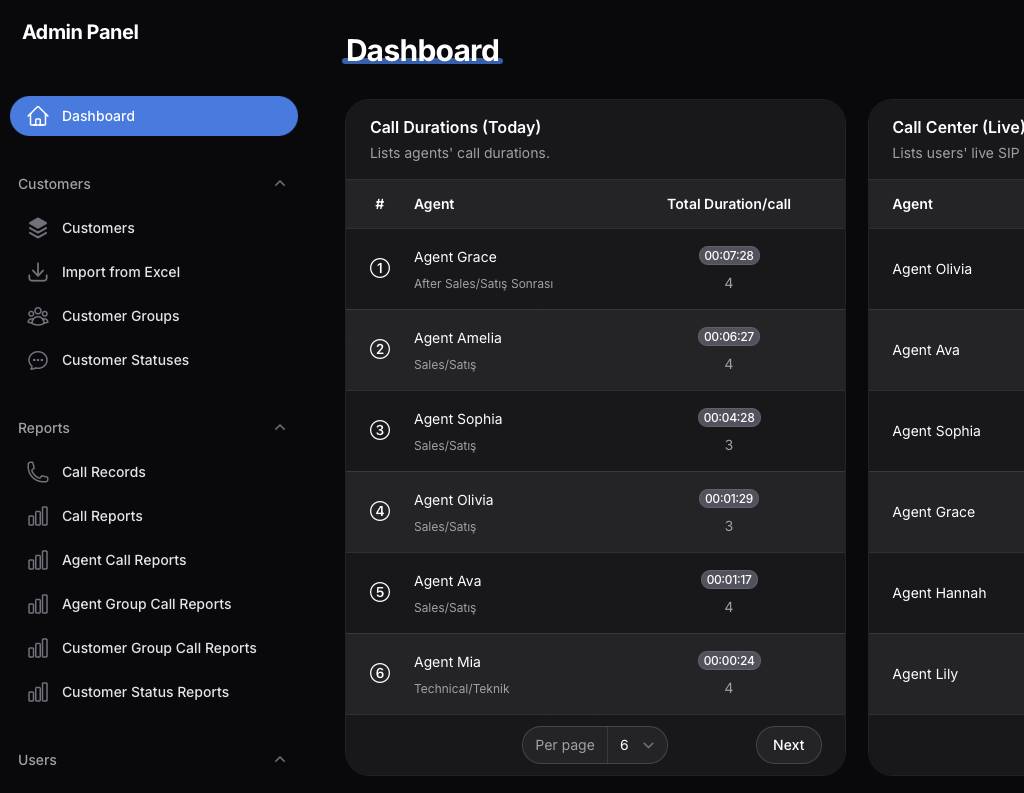
Every homepage includes a live widget showing real-time agent status. Monitor which agents are online or offline on the SIP (PBX) side, helping supervisors manage workforce availability instantly.
Whisper / Call Monitoring Module
Supervisors can join live calls using the “Listen Live” button. Listen to conversations between agents and customers, then speak privately with the agent for coaching and quality control without the customer hearing.
Call Recordings Page
Access all recorded conversations in one secure screen. View call duration, agent details, and customer information. Listen to the audio recording anytime after the call ends.
Call Durations Widget
Track daily call times for all agents directly on the homepage. The list is automatically sorted by total talk time. Each agent can also see the top 5 performers within their own user group.
Call Reports Page
Generate daily reports for inbound and outbound calls. View detailed columns including answered, busy, failed, unanswered calls, and total duration. Filter by date and call type, with automatic totals at the bottom of the table.
Agent Call Reports Page
Monitor individual agent performance with daily inbound/outbound call statistics. See answered, busy, failed, unanswered calls, and talk time per agent, complete with column totals and page summaries.
Agent Group Call Reports Page
Review aggregated performance reports for each agent group you create. Get total call details and statistics across the entire group.
Customer Group Call Reports Page
One of the most popular features for users who import data via Excel. Assign customers to specific groups during import (e.g., by campaign, region, or product). This page shows complete call statistics and analysis for each customer group, allowing you to evaluate campaign or segment performance from a single screen.
What is a Call Center CRM and What Does It Do?
A call center CRM is a centralized platform that manages all customer communications and interactions. It optimizes sales processes, improves service quality, and helps businesses build stronger, long-term customer relationships by combining telephony with customer data in one unified system.
Advantages of Call Center CRM Software
- Centralizes all customer data in one secure location
- Automatically stores and organizes call recordings
- Accelerates sales and follow-up processes
- Provides powerful real-time and historical reporting & analytics
- Increases agent productivity and reduces average handling time
- Enhances customer experience with personalized service
How we set up a Call Center CRM
- Perform a detailed needs analysis
- Choose the right integrations (Asterisk PBX, SIP, etc.)
- Create user accounts and define roles
- Complete the PBX and telephony integration
- Train your team for maximum efficiency
Best Call Center CRM Features You Should Look For
- Automatic call recording and logging system
- Real-time reporting and live dashboards
- Strong integration support (Asterisk, SIP, API)
- User-friendly, responsive interface compatible with mobile and tablet devices
- Click-to-call, call monitoring (whisper/barge), and advanced privacy controls


